The space your client signs into
What a client can see and do without asking you: open their instance, stop it, read what they pay, settle an overdue bill, and resize their own plan. And the one rule behind all of it — nothing is ever debited off-session.
Verified on September 18, 2026
Every other guide is written for you. This one describes what your client sees when they sign in — because the size of your support load depends on how much of it they can do without writing to you.
The space is called My space, and it is white-label: your brand, your domain, no mention of us. What follows is the same screen from your side of it.
Two ways in, and one of them is not yours
A client who was created on your environment — by you, or through a signup link — signs in and lands on their dashboard: at the top, what needs their attention and four figures (instances, amount to settle, next renewal, last payment); below, three tabs — Overview (their instances), Subscriptions & payments, New instance.
Someone who bought on the public marketplace instead has no link to any single provider. Their instances live across whoever sold them, so the space shows them theirs and, if it cannot place them with a provider at all, says so and points them at the marketplace rather than at an empty page.
You will meet the difference the day a client tells you they "cannot find their instance". The question to ask is where they signed up.
How they get there. The space lives at /portal, and it now has a visible door on every public
page: the Client space link in the site bar, My space in the marketplace's, a notice on the
integrator sign-in page that sends a stray client to their space or to the marketplace, and Client
space in the footer. A client who signs in to the integrator console by mistake will never see their
instances there: these are two separate accounts.
The session keeps itself alive. The access token lasts five minutes, but the space renews it before it lapses — on load, whenever the tab comes back, and every few minutes while it is visible. If the session is really over but the identity provider still knows the person, the space takes it back without asking; otherwise it shows the sign-in card with "your session has ended". A client no longer has to reload the page to "reconnect".
The instances, and what a client may do to one
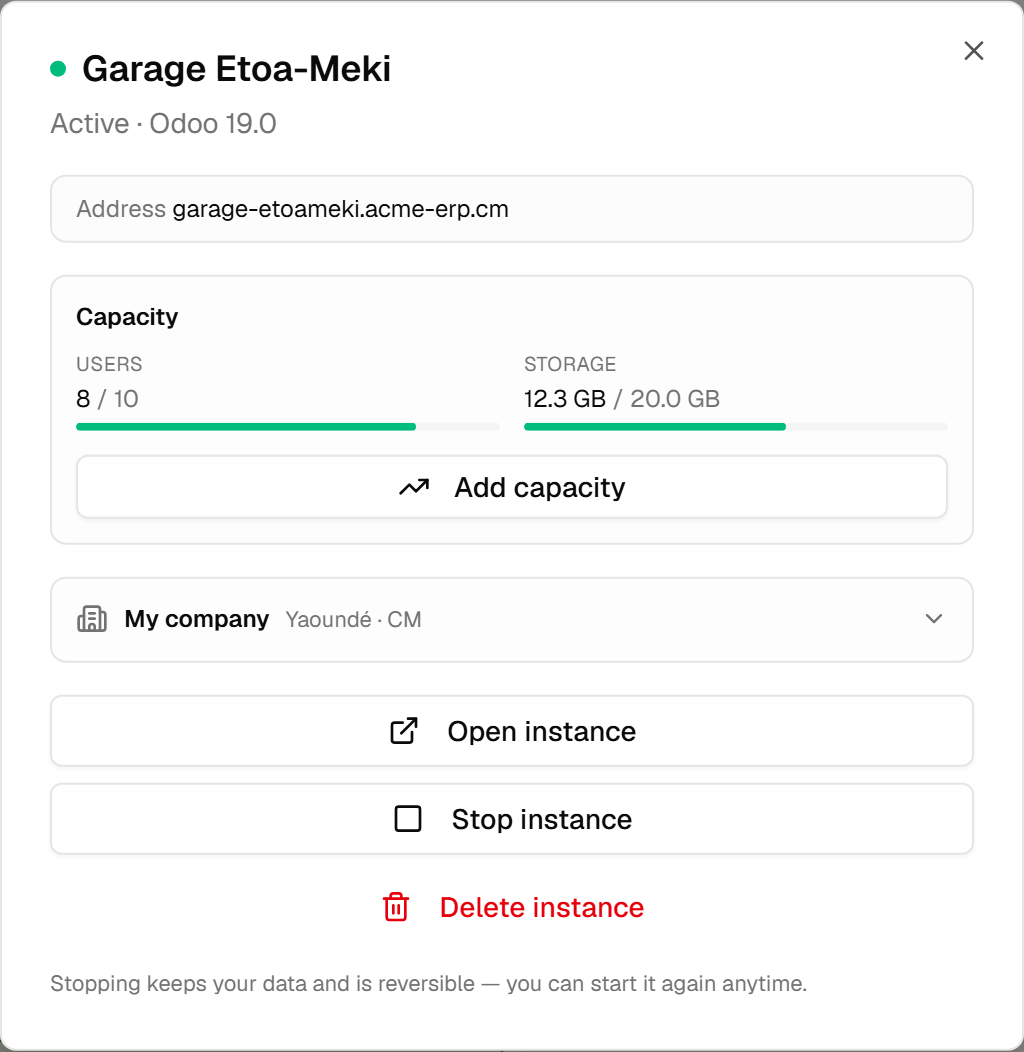
Opening one gives them four actions and two panels.
| Action | What it does |
|---|---|
| Open instance | Their Odoo, in a new tab. |
| Stop instance | Reversible. Data kept, the address stops answering. |
| Start instance | Back on. |
| Delete instance | Permanent, behind a confirmation that says so. |
Yes — a client can delete their own instance. It asks a plain question first and states that it cannot be undone. If that is not what you want for a particular customer, the answer is not to hide the button but to keep the backups the backup guide describes; deletion is theirs to ask for, recovery is yours to have prepared.
The two panels are Capacity — users and storage against what their plan includes, with a way to buy more — and their company details, which is what becomes the company inside their Odoo. An axis nobody has measured is shown as not measured rather than as zero.
Manage now opens the instance's own page, where each panel has a column (no more dialog
scrolling sideways). Two more panels since 2026-09-18, modelled on Odoo Online's database manager: My backups — the
automatic daily copy, a copy on demand, the full export of their data, each downloadable — and
Duplicate, which buys a new instance starting from a copy of this one, billed like any instance.
The "Test copy" box turns off outgoing email, scheduled actions and payments, deactivates every user
but the administrator and hands them a new access. Restoring a copy onto a live instance stays your
move, from the Instances tab: the client tells you the date. And My domain: the client enters
erp.theircompany.com, the panel gives them the DNS record to create (relative host and value), checks
it live, and activates the domain only once it points here — a name the platform already serves, yours
included, is refused.
What they are paying
The Subscriptions & payments tab lists their subscriptions: one card per thing they pay for, with its status, the amount, the duration it covers, and the dates that matter — each in a sentence that is true of that state, and of whether the date is behind or ahead. A lapsed card no longer says "service assured until" with a date already gone.
Four states, and the sentence beside them is not the same:
- Active — "next renewal on … (in N days)".
- Trial — "trial ends on …".
- Payment overdue — "overdue since …" and "settle before …", the second in bold. Once the deadline has passed, the card says so: the instance may be suspended at any moment.
- Lapsed — "lapsed on … for non-payment", "instance suspended since …". Paying reactivates it, and the new period starts the day of the payment.
Everything that needs an action also shows at the top of the dashboard, with the button that leads to it: an overdue payment, a suspended instance, each with the amount and the date.
Below the cards, the payment history: every purchase and renewal, with its status. A payment that failed carries the reason next to it, in the client's language: confirmation timed out, insufficient balance, refused from the phone, declined by the operator… so a client who was refused knows whether to retry, top up, or try another method. An expired payment charged nothing, and the client can start it again from the card.
Paying, and why nothing happens by itself
This is the rule to take away, and it explains the whole screen: no payment rail here debits a client off-session. There is no stored mandate that quietly takes money on the renewal date.
So an unpaid period is not a failure — it is an amount waiting. The client comes to the space and presses the button, and only then does anything move: a PIN prompt on their phone, or a secure payment page in a new tab. Which of the two they get is their choice, and both are on the card, above the button: the rail, the method, and the phone number that will be debited — visible so it can be corrected.
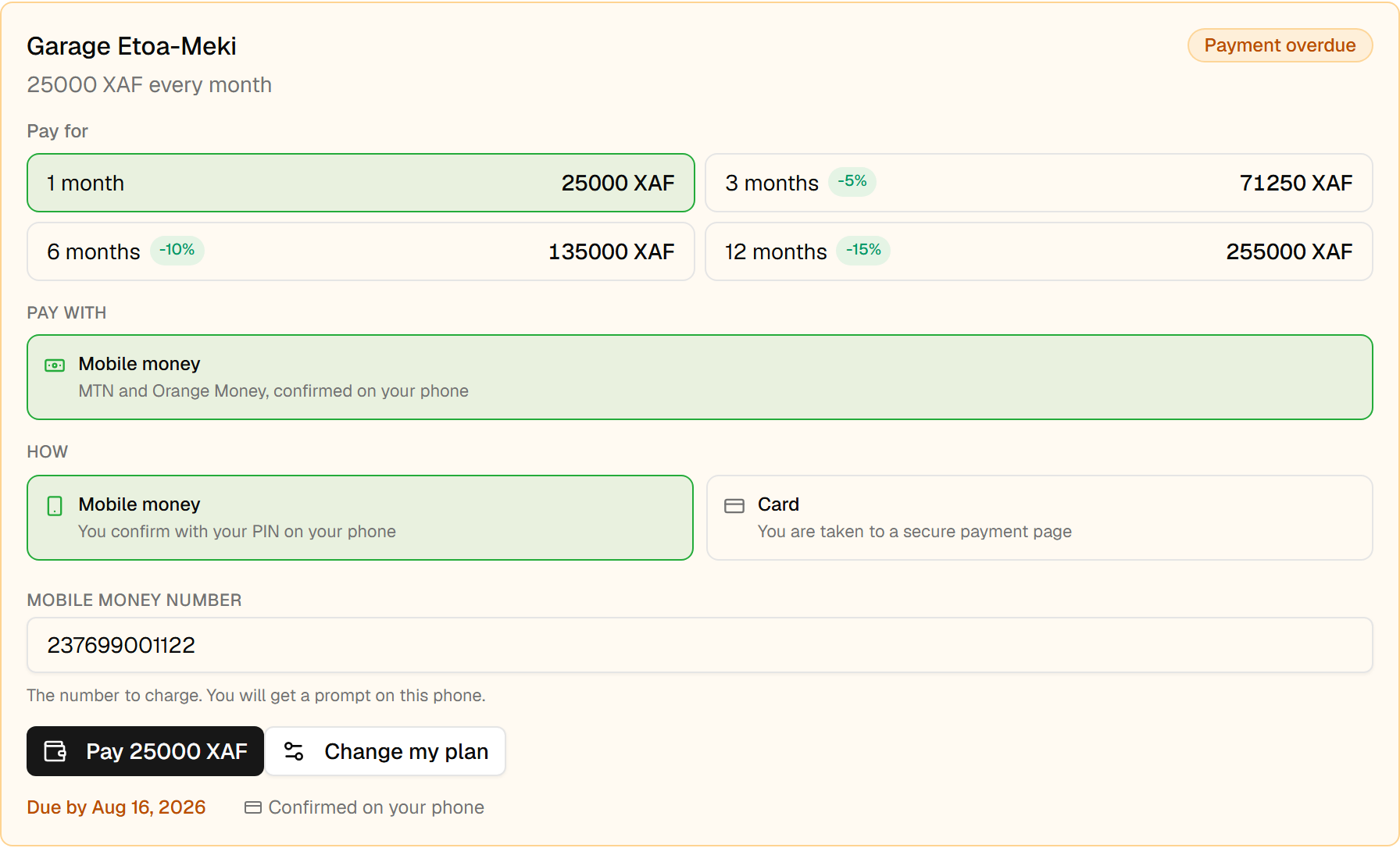
Two consequences worth planning for. A renewal will not happen while nobody looks at it, so the notice that a payment is due matters more than it would elsewhere. And a client whose SIM changed can fix it themselves, which used to be a support ticket.
If the amount cannot be collected on the rail they chose — some rails cap what they will take at once — the card says so before they press anything, and the durations that do not fit are shown disabled with the reason. A button that could only end in a refusal is worse than one that is not offered.
Growing and shrinking, without you
Change my plan, on the subscription card, lets them move the axes your offer actually sells — users, storage. They also reach it from the overview: under each instance's gauges, Adjust opens that panel directly, because "5 / 5 users" is where the question comes up, not the payments tab. The two directions are not symmetrical:
- Bigger costs the difference for the days remaining in the period already paid for, and lands immediately once paid.
- Smaller costs nothing, refunds nothing, and takes effect at the next renewal. It is shown as scheduled until then, so a reduction asked for in March does not arrive in April as an unexplained drop.
Every figure on that panel comes from the server, and the amount is priced again when they confirm. A price that travelled through a browser is a price the browser chose, and this one never does.
An offer that sells neither axis shows no panel at all — there is nothing to move, and a disabled control would only invite them to press it.
What this changes for you
Three things follow from all of the above, and they are worth knowing before your first client arrives.
The credentials shown when an instance is created are shown once. Your client is told so, in those words. If they lose them afterwards, the recovery is the one in the Odoo access guide — a new password, issued by you, which kills the old one.
Suspension is not deletion. A client past their grace period stops being served and keeps everything; paying reactivates them. Your quota policy can do the same thing for a different reason, and it resumes them by itself when they come back under their limit.
And the space is only as good as what you put in the offer. The capacity panel, the duration choices, the resizing — each of them appears because the offer sells that axis. An offer with no per-user rate is an offer whose clients must write to you in order to grow. That can be exactly what you want; it should not be something you discover later.