From nothing to a first instance
The account, the team it belongs to, the country that fixes your currency, and the four answers that create your first instance. Fifteen minutes, and none of it costs anything yet.
Verified on September 13, 2026
Every other guide starts somewhere inside the product. This one starts before that: a new account, an empty dashboard, and the four questions between you and a first instance.
Nothing here bills you. An instance is a project, not a machine — the first thing that costs money is an environment inside it, and that is the next guide.
The account
Registration happens on our sign-in service, not on a form in this application. You are sent there, you create the account, and you come back signed in. You can also continue with an existing GitHub, GitLab or Google account instead of choosing a password.
The practical consequence: your password is never typed into a RollBackk page and never stored by one. If your organisation later moves to a single sign-on provider, the same door is where that gets plugged in, and nothing about your instances changes.
Then verify your address. An unverified one is refused by everything that sends you something — the notifications guide covers what that means once you have things running.
The team, and why everything hangs off it
You do not own instances. Your team does, and you are a member of it.
A brand-new account gets a team of its own, so there is never a first screen asking you to create one before you can do anything. If you were invited to somebody else's team instead, you land in theirs.
This matters sooner than it sounds, because three things belong to the team rather than to you: the instances and their environments, the balance that pays for them, and who is allowed to do what.
The team also holds the plan. A new team starts on the free plan, which has real limits of its own; the billing guide covers changing it.
So a colleague added to the team sees the same instances you do, and the members-and-roles guide is how you decide what they may do with them. If you belong to several teams, the switcher at the top decides which one you are working in — and it decides which balance is charged.
Your country, and the currency it sets
On the billing page, one answer comes before all the others: the team's country.
It sets the currency every price on the platform is quoted in and every invoice is denominated in. It is not a display preference — nothing converts at the moment of payment, so the currency you are given here is the currency you are charged in.
We may pre-fill it from where the connection appears to come from. That guess is labelled as one, because a value that filled itself in is the kind people confirm without reading. Check it before you confirm: moving later to a country with a different currency is only possible while nothing is billing yet — no balance, no running environment, no open invoice.
You can pick your interface language separately, at any time, and it changes nothing about what you pay.
The first instance
An instance is a project: one repository, one Odoo version, one region — and the environments built from them. Creating one asks four things.
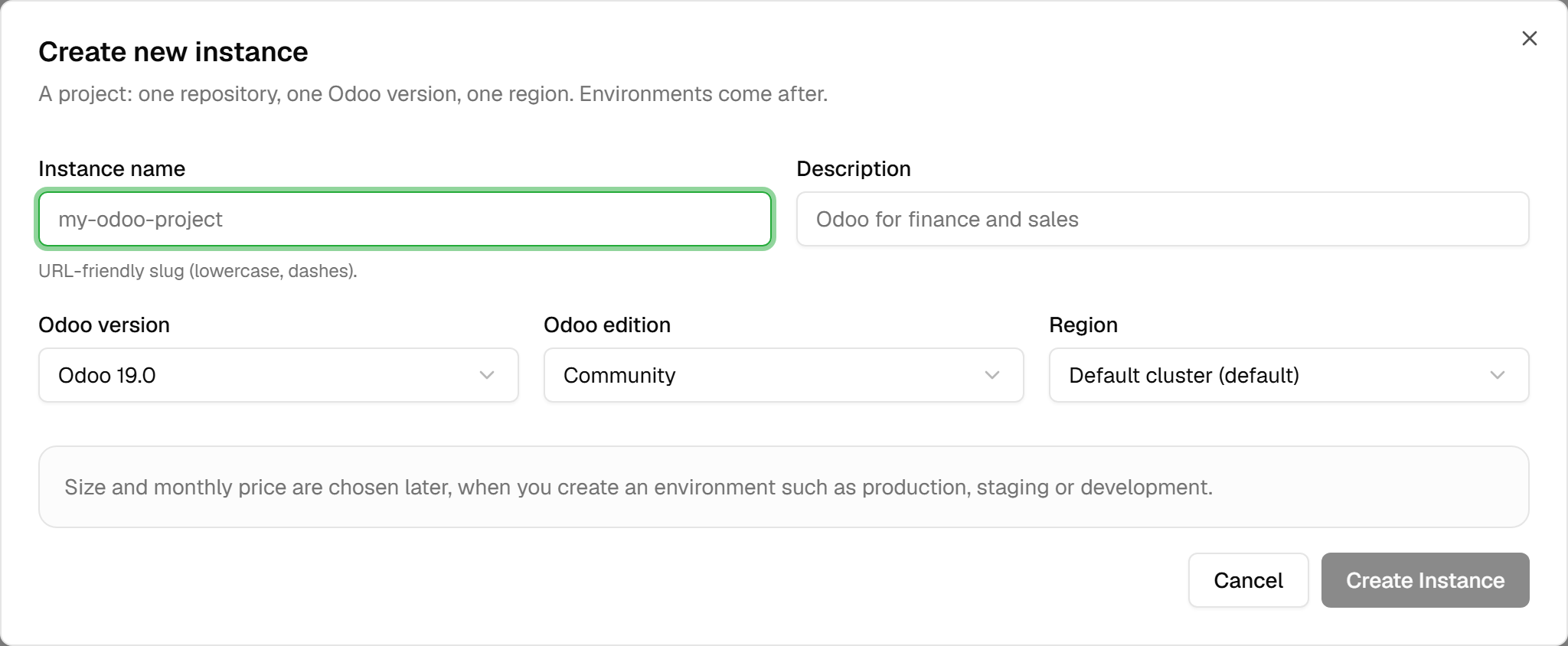
The name becomes part of every address. It is formatted for you as you type — lowercase, dashes — and needs at least three characters. It has to be unique inside your team; another team may use the same one.
The Odoo version and edition. The version list is what the platform currently offers, newest first. Enterprise requires your own Odoo subscription; we do not resell it. Before an Enterprise instance can deploy, its settings need access to the Enterprise repository — a read-only token is enough. Save your subscription code there too: without it, Odoo shows an expiry warning and then locks the database after 30 days.
The region decides where the environments will run. One is marked as the default, and unless you have a reason — where your clients are, where your data is required to stay — the default is the right answer.
Note what the dialog does not ask: how big, how much. Those belong to an environment, and one instance can hold a small development environment and a large production one at the same time.
Creating one takes you straight to it, on a page with no environment in it yet.
What to do next
The instance is an empty shell. Two roads lead out of it, and both have their own guide:
- Connect a repository and deploy your code — the Git integration, a build, an environment. This is the path if you already have modules to run.
- Duplicate something that exists — if you are moving an Odoo you already operate, start from the backup-and-restore route instead of from an empty database.
Creating an instance needs instances.create, and it is the permission the team owner holds from the
start. Seeing the ones that exist needs only instances.view, which is why a new colleague can look
around before they can change anything.