Backups you can actually restore
How long a backup really lives, what a restore overwrites, and why the safety copy taken before it is not the undo button it sounds like.
Verified on September 13, 2026
A backup is only worth what you can get back out of it. This guide is about the two places that quietly decide that: how long a copy survives, and what happens the moment you restore one.
The guide on duplicating an environment covers taking a backup and cloning from it. This one covers the rest of the life of that copy — including the part nobody reads until the bad day.
Where it lives, and who can touch it
Everything here is on the environment's Backups tab, and the tab itself only appears with the
environments.backups permission. The Restore button needs a second one, environments.restore, and
it is missing rather than greyed out for anyone without it.
Both belong to the Developer role and above. A Viewer sees no backups tab at all: the list carries sizes, dates and download links for your entire database.
A copy is stored away from the environment, so it survives an environment that has broken. It does not survive one that has been deleted: deleting an environment purges every backup of it. That is the one irreversible sequence worth memorising — download first, delete second.
The schedule, and the ceiling that is not the retention
Automatic backups is a switch, a frequency and a retention. The frequency offers exactly two choices: daily at 02:00 UTC, or weekly, Monday at 02:00 UTC. That is UTC, not your local time — in Douala it runs at 03:00.

Retention is where the surprises are, and there are four of them.
Your plan sets a ceiling. Each plan allows a longest retention. Ask for more and the schedule is saved with the plan's maximum instead — it is not refused, and the number you see after saving is the one that will be honoured. Taking a backup by hand and restoring one stay available on every plan.
The expiry is stamped when the copy is created. Each backup carries its own expiry date, computed once from the retention in force at that moment. Raising the retention from 7 to 90 days does not extend a single backup already in the list — it only changes the ones taken from now on.
"Backup now" does not use this field. A backup you take by hand is not attached to the schedule, so it gets the platform default of 30 days, whatever the number in the box says. The field belongs to the block it sits in: it dates the scheduled copies.
Age is not the only thing that removes a copy. A nightly sweep keeps the ten newest successful backups per environment and deletes the surplus, whatever their expiry date. So a daily schedule with 365 days of retention does not give you a year of history: it gives you about ten days. Retention sets how long a copy may live; the sweep sets how many may live at once, and whichever is reached first wins.
One last number behaves differently again: an environment may hold twenty backups, and reaching that ceiling refuses the next one instead of deleting an old one. If "Backup now" comes back saying the quota is reached, nothing broke — delete a copy you no longer need and take it again.
Restoring replaces this environment
Restore puts a backup back into the environment you are looking at. Not a copy of it. The current database and filestore are replaced, and everything written since that backup is gone.
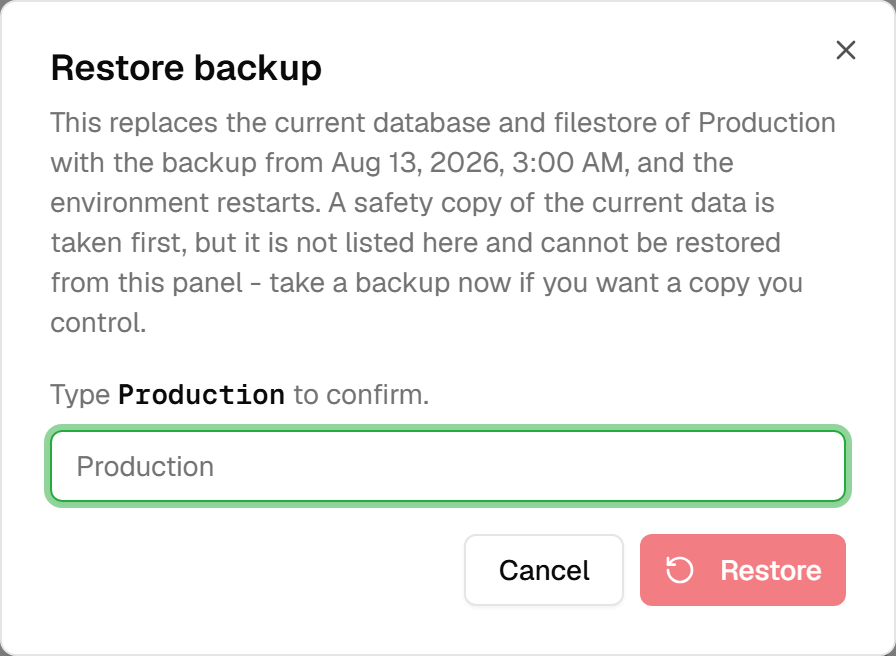
Three things about that dialog are worth knowing before you meet it.
It asks you to type the environment's name, and the button stays inert until you do. On a screen with this consequence, a click you can make by reflex is not a confirmation.
The environment stops for the duration. The restore needs the database to itself, so the platform takes it down, restores it, and brings it back. Your users are offline for as long as the restore takes, which for a large database is tens of minutes.
And a retry cannot become a second restore. Each attempt carries a name the platform recognises, so a request replayed after a timeout or a lost connection is answered with the first attempt's outcome — or told plainly that it is still running — instead of starting another one over data the first is still writing. This matters more than it sounds: a restore has no natural way to refuse a duplicate, and two at once has no good outcome.
Only a successful backup can be restored. A failed or still-running copy leaves the button disabled, and its tooltip says why.
The safety copy, and what it is not
Before overwriting anything, the platform takes a copy of the environment's current state. This is true, and it is the sentence most likely to be misread.
That copy is not listed on this tab. It cannot be downloaded, and it cannot be restored from here. It is a net held by the platform, kept for about a week, and reaching it means asking support — it is not an undo button, and you should not plan a restore around having one.
The practical consequence is one habit: if you want a copy of the current state that you control, take a backup before you restore. It takes one click and a few minutes, and it is the difference between "we can go back" and "we can ask whether someone can go back".
What is running, and what already happened
The restore history below the list records the restores you launch from this screen: when each started, in-place or otherwise, and how it ended. While one is running the row updates on its own.

Each row opens its logs — live while the restore runs, kept afterwards, so a restore that failed overnight is still readable in the morning.
One distinction saves a lot of confusion: restores that run while an environment is being created — from a template dump, or from a clone — are not in this history. They have their own button at the top of the tab, Provisioning logs. When a new environment will not start, that is where its restore is, and looking for it in the history finds nothing at all.
Bringing a copy in, and taking one out
Download hands you the archive itself, through a link valid for fifteen minutes. It is how you keep a copy outside the platform, and the honest answer to "what if we leave?".
Import goes the other way: a dump you already have — .zip, .sql, .sql.gz, .gz, .dump or
.backup — becomes a backup of this environment, restorable like any other. The file goes straight
from your browser to storage without passing through the platform, which is what makes a multi-gigabyte
upload possible, and also what makes a failure at that step say so little. An import that fails
immediately is usually the connection or the file, not the platform refusing it.
An imported copy counts against the twenty, like any other.
Deleting a backup removes the stored archive. It cannot be undone, and it is the copy that goes, not the environment — the confirmation says which copy, by its date, because "delete this backup?" with nothing else on screen is not a question anyone can answer safely.
When it refuses
The refusals worth recognising, and what each one actually means:
| What you see | What it means |
|---|---|
| Backup quota reached | Twenty copies already exist for this environment. Delete one and retry. |
| Only successful backups can be restored | The copy you picked failed or is still running. |
| Unsupported file type | Import accepts .zip, .sql, .sql.gz, .gz, .dump, .backup. |
| The upload failed | Browser to storage, not the platform — retry, and check the connection. |
| A backup is already in progress | One is running for this environment. Wait for it rather than retrying. |
And one last habit, which is the only thing on this page that is actually a test: restore a backup before you need to. Clone the newest one into a throwaway environment, open Odoo, check an attachment and not just a record, then delete the clone. A backup nobody has ever restored is a belief. The clone makes the test free of risk, and the guide on duplicating an environment walks through it.