Managed PostgreSQL, and what it is not
A managed database is not the database Odoo runs on - unless you make it one. How to size one, what it really costs, and the two very different ways an environment can use it.
Verified on September 13, 2026
Databases in the sidebar gives you managed PostgreSQL: replicated, with automatic failover, backed up, and billed like an environment.
The first thing to be clear about is what it is not. Creating one does not move your Odoo onto it. Your environment keeps running on the database it was born with until you explicitly say otherwise, and most teams never do — they create a managed cluster for something else entirely, and that is the normal case, not the exception.
What a cluster is for
Three uses, in rough order of how often they come up:
- A database for your own code. A module that stores its own data, an integration, a reporting schema — anything you would rather not put inside Odoo's schema.
- A database for an application that is not Odoo at all. A separate service, a script, a tool your team runs. It is plain PostgreSQL; nothing about it is Odoo-specific.
- The database Odoo itself runs on, if you want the environment's own data on a replicated cluster rather than the shared platform one. That is an explicit switch, described further down.
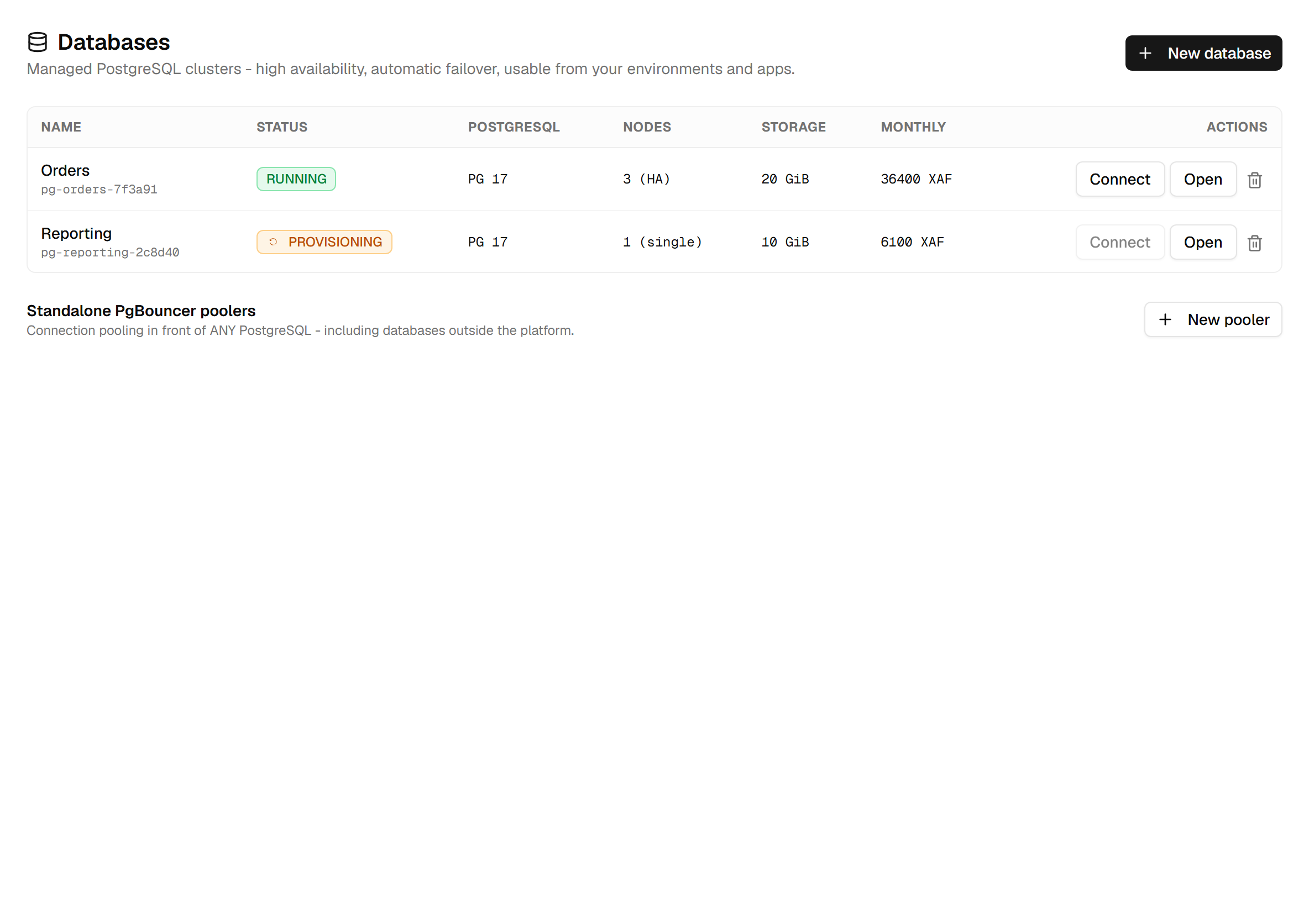
The list is also the honest view of state. A cluster goes requested → provisioning → running, and the actions on its row stay disabled until it gets there. That takes minutes, not seconds — it is real storage and real replicas being brought up.
The shape you choose, and the two numbers
New database asks for four things: a name, a plan, a PostgreSQL version, and how much storage.
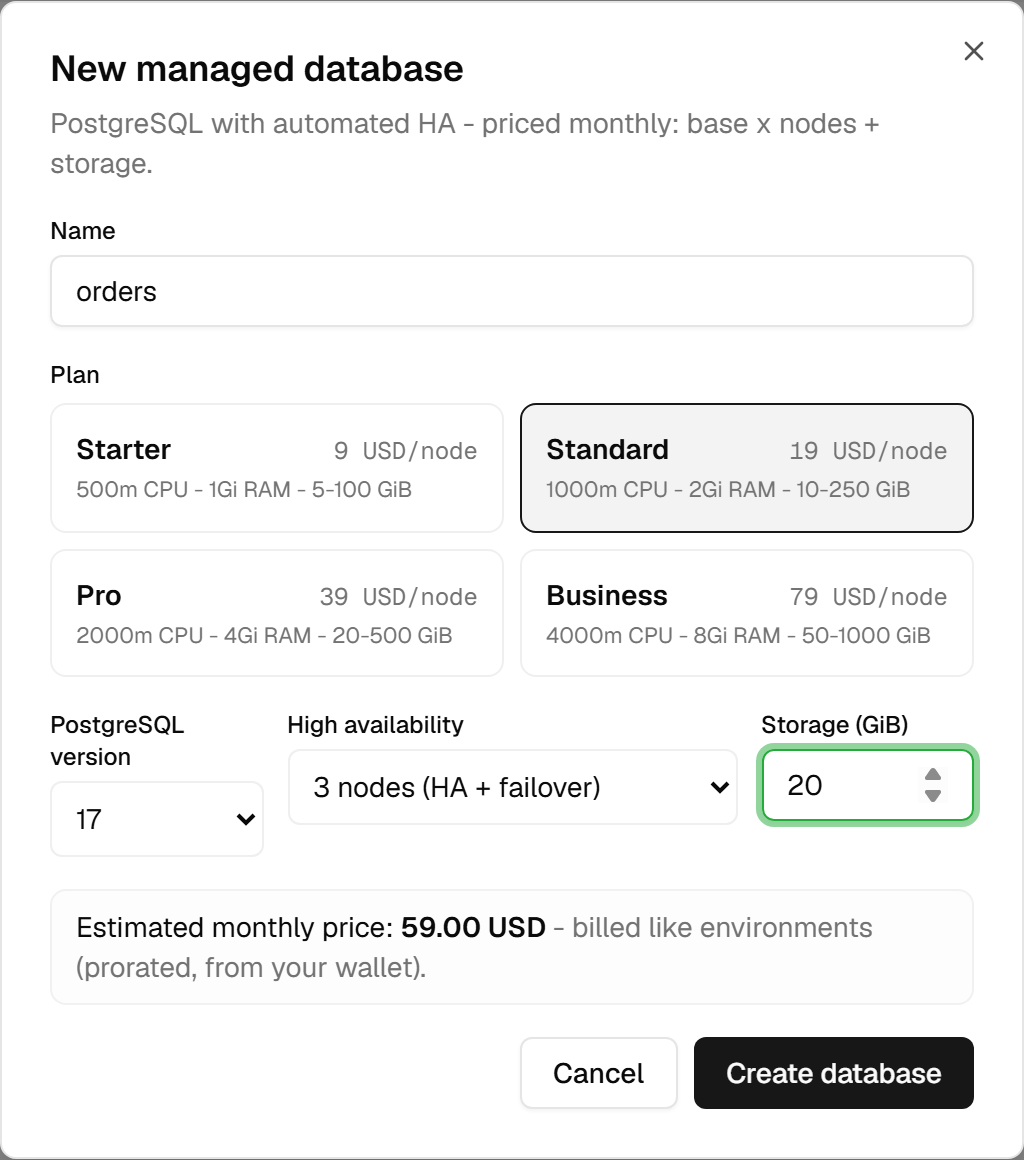
Two of those choices deserve a sentence.
High availability is one node or three. There is no two-node option on any plan. One node is a single instance; three is a primary with two replicas and automatic failover — the smallest shape that still holds a majority when one node is lost, which is what makes failover a decision rather than a gamble.
Storage only ever grows. You can raise it later; you cannot lower it. Start where you expect to be in a few months rather than where you are today — undersizing is cheap to fix, oversizing is not.
Then the two numbers. The wizard shows an estimate, computed in your browser as base price × nodes + per-GiB price × storage, in the plan's own currency. The number you are actually charged is produced by
billing when the cluster is created, in your team's currency, and that one is what the list shows. If
the two differ, the list is right.
Money is also the first thing checked. Before anything is created the platform asks billing whether you can afford the new monthly run-rate. A suspended account is refused outright; an insufficient balance is refused with the amount you are short. And if billing itself cannot be reached, creation is refused rather than allowed through — the safe direction when the alternative is giving away a database nobody is charged for.
Connecting to it
Connect on a running cluster opens everything you need, and nothing you do not.
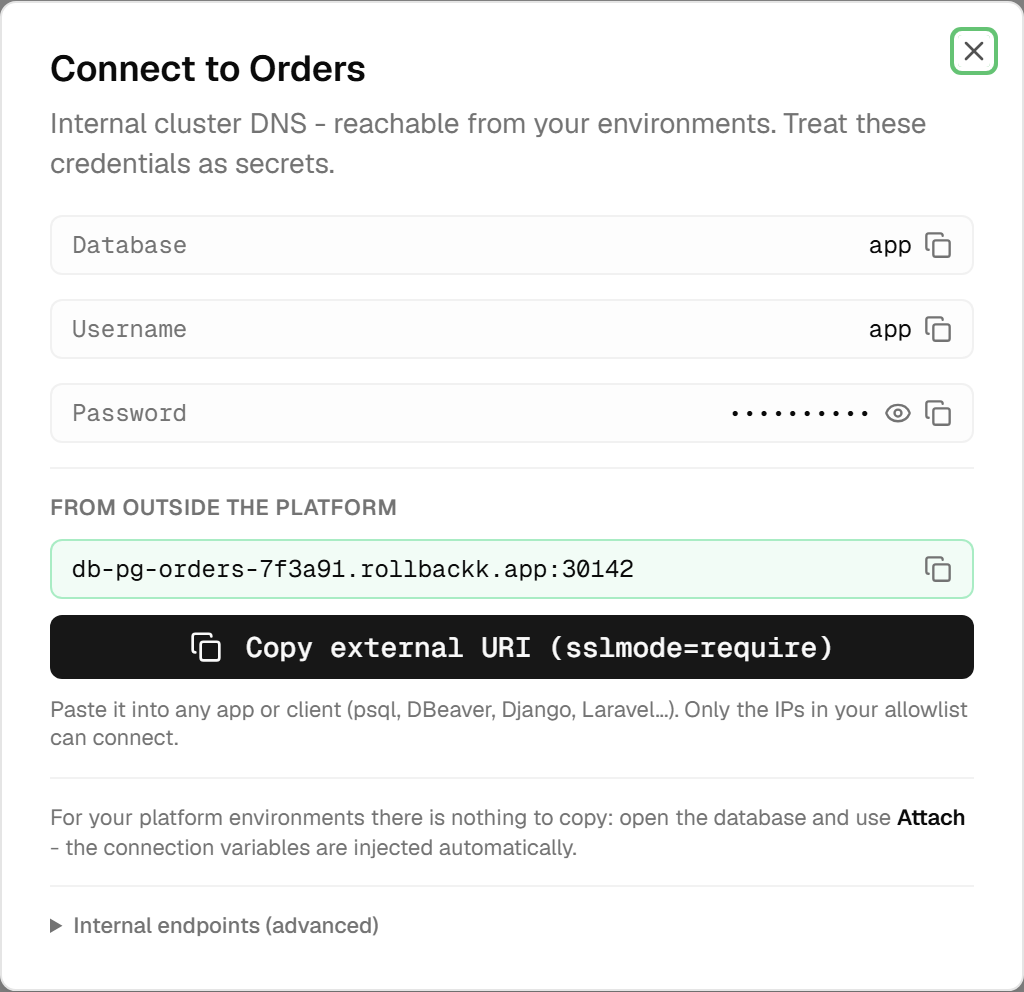
The password is masked until you ask for it, and every row copies with one click. Below that sits the
external address, if you have enabled external access, and a button that copies a ready-to-paste URI with
sslmode=require already on it — that is the one to give psql, a database client, or an application
hosted elsewhere.
The folded Internal endpoints (advanced) section holds the addresses that only resolve inside the platform. They are what your environments use, and they will not work from your laptop; there is rarely a reason to open that section at all.
Two more things live here. Rotating the password is one button — and it also re-injects the new credentials into every environment that has this cluster attached, and restarts them, because otherwise those environments would be holding a password that no longer works.
And seeing connection details at all requires database.connect, which is a separate permission from
database.view. Someone can be allowed to see that a cluster exists, its size and its cost, without ever
being handed its credentials.
The two ways an environment uses one
This is the distinction the whole page turns on, and the environment's Databases tab shows both at once.
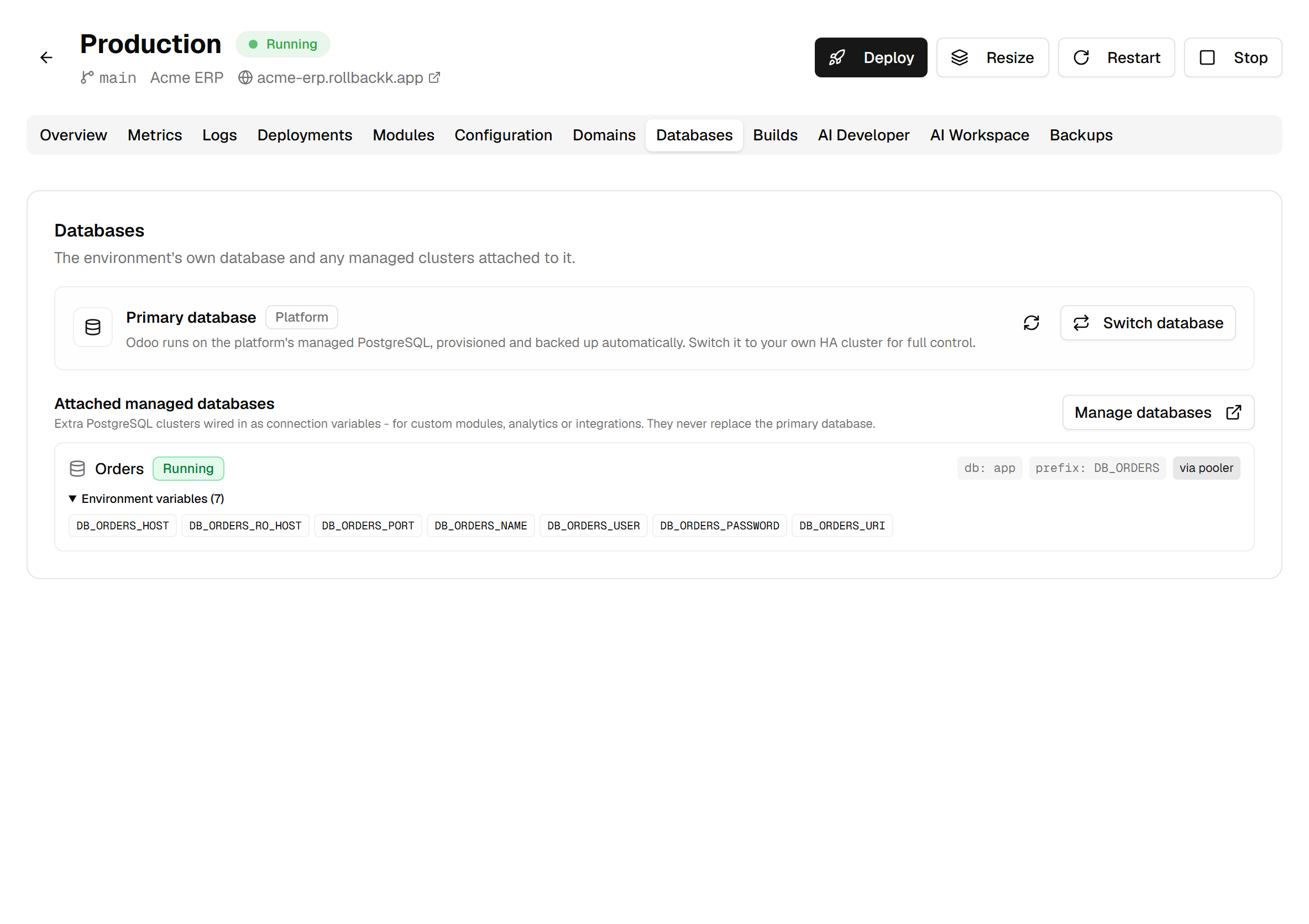
The primary is the database Odoo itself runs on. By default that is the platform's own PostgreSQL, and the card says so. Switch database moves it — onto one of your running clusters, or back to the platform — and it is a real migration: the data is dumped, restored on the target, and the environment is repointed. It asks you to type the environment's name first, then runs in the background with its state on the card. One check will stop you: an Odoo version that needs a newer PostgreSQL than the target cluster offers is refused before anything moves.
Attachments are the other relationship, and they change nothing about Odoo. Attaching a cluster injects seven variables into the environment's processes — host, read-only host, port, database name, user, password and a ready-made URI — all under a prefix you choose, and restarts it so your code can read them. Attach a second database and you get a second set under a second prefix; the platform recomputes the whole set every time, so attaching and detaching converge instead of drifting.
The panel lists the variable names and never the values. The names are what your
code needs, and they are safe to show to anyone who can see the environment. The values require
database.connect, and they only ever exist inside the running processes.
Attaching happens from the Databases page, because one cluster can serve many environments. Switching the primary happens here, because it is a property of this one environment.
Growing it, backing it up, going back
Open a cluster and you get its own workspace: overview, configuration, backups, exports, network, metrics and logs.
Resizing changes plan, node count or storage on a running cluster. Billing is updated first, and if the change cannot then be applied the billing change is rolled back — you are not left paying for a size you did not get. Storage, again, only grows.
Backups run on their own — a full backup daily at 02:00, kept for seven days — and you can take one on demand at any time. Restoring works differently here than anywhere else on the platform: a restore creates a new cluster from the backups, optionally at a chosen point in time, and never touches the source. That is the safest possible shape for a restore, since the thing you are trying to rescue is still there if the restore turns out wrong. It also means the restored cluster is a second cluster, with its own monthly price, until you delete one of them.
Configuration exposes an allowlist of PostgreSQL settings. Values are checked against the range your plan actually permits before they reach the server, so a bad setting is refused in the form rather than breaking a restart. Clearing a field returns that setting to its default.
Network is where external access is turned on, and it comes with a rule: an IP allowlist is
mandatory. The platform will not expose a database to the whole internet, so there is no way to enable
external access without saying who may connect. Addresses are given in CIDR form, like
203.0.113.10/32, and connections use TLS.
When it refuses, and who is allowed
| What you see | What it means |
|---|---|
| Insufficient balance for this database | The prepaid gate. Top up, then retry. |
| Your account is suspended | Unpaid invoices; settle them first. |
| Billing is temporarily unavailable | The gate could not be reached, so nothing was created. Retry shortly. |
| Storage can only grow | Lowering storage is not possible. Restore into a new cluster instead. |
| The database must be running first | Resize, parameters, backups and attachments all need a running cluster. |
| This database hosts the primary of N environment(s) | Delete refuses while environments run on it. Switch them first. |
| An IP allowlist is required for external access | Name who may connect before opening the door. |
Four permissions split this surface: database.view to see clusters,
database.create to add one, database.manage to resize, configure and open external access, and
database.connect for credentials and attachments. Deleting sits with team admins and owners — like
deleting an environment, it destroys data.
One last thing worth reading before you click it. Deleting a cluster destroys its storage and all of its backups: there is no restore afterwards, from anywhere. Environments attached to it lose their variables and restart. The confirmation lists all of that and asks you to type the cluster's name — and that list is accurate, which is the only reason it is worth reading.