Your balance, and what happens if it runs out
How prepaid credit is spent, why your balance is not what you can spend, and the exact ladder from a warning to a suspended account.
Verified on September 13, 2026
The platform is prepaid: you hold a balance, and what your environments cost is taken from it day by day, as they run. The monthly invoice then records what was taken. Nothing is charged to a card you left on file, and nothing is charged after the fact.
That has one consequence worth reading this page for. A balance that looks healthy can already be spent, and the number that tells you so is not the big one at the top.
Balance is not what you can spend
The Billing page opens on your prepaid balance. Underneath it are three lines, and the third is the one that matters:
- Monthly usage — what your running environments cost per month, added up. This is your burn rate.
- Required to add capacity — what you must have available before you can create, start or resize anything. Where a tax applies to your country, it is included, because that is what you will pay.
- Unpaid invoices — subtracted from your balance before any of the above is judged.
The platform reasons about balance minus unpaid invoices. A balance of 18 000 with 45 000 unpaid is not 18 000 of room; it is a shortfall of 27 000, and the coverage line will say zero days.
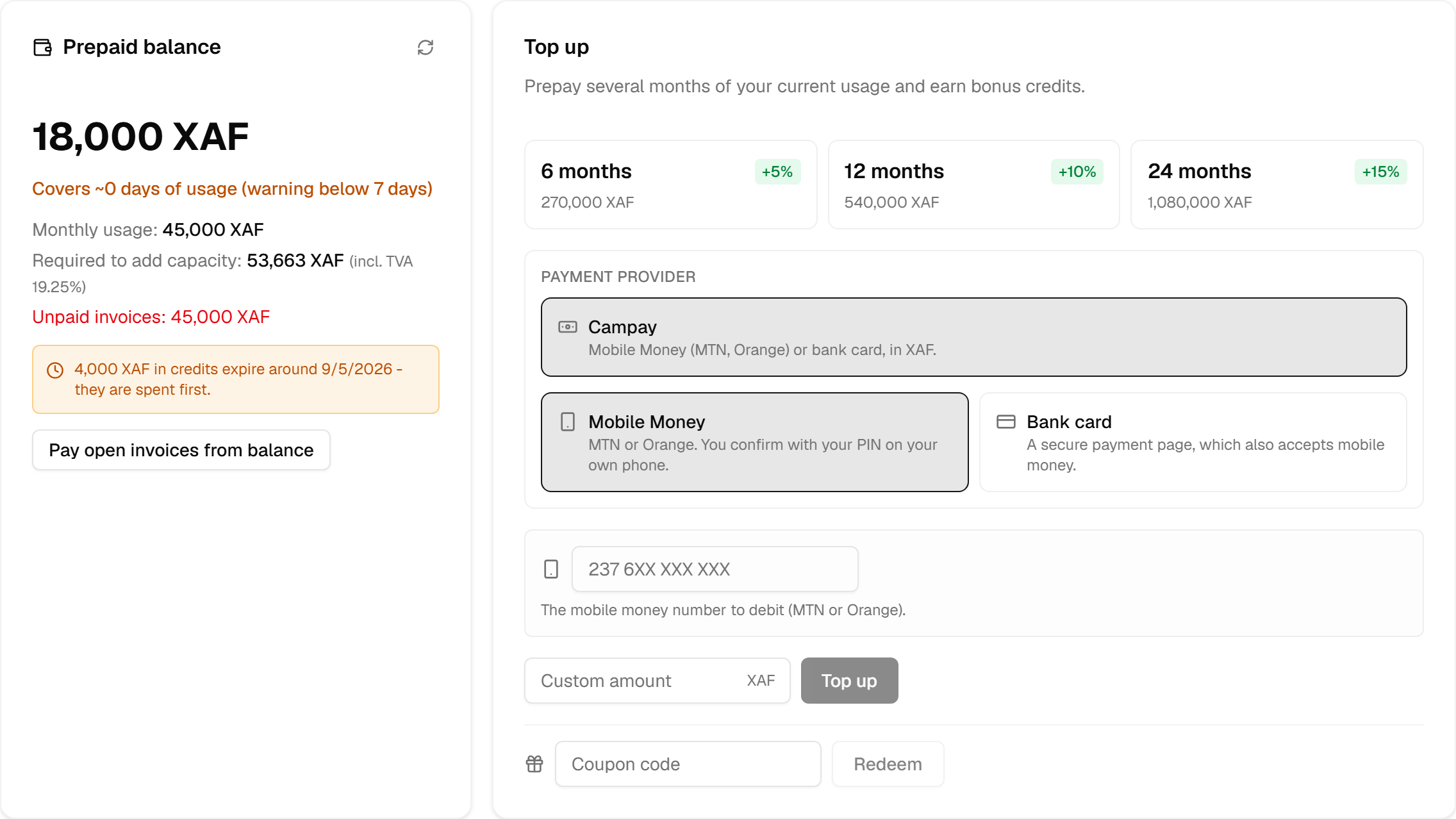
The coverage line — covers ~N days of usage — is that arithmetic turned into the unit you actually think in. It is available balance, after debt, divided by your monthly burn.
Topping up, and why months buy more
Top-up amounts are offered as months of your current usage rather than as round numbers, because the question being answered is "how long am I covered for", not "how much money is this". Those month tiers appear once an environment is running, since they are priced from your usage; until then, top up any amount.
Prepaying more months earns bonus credit: the tiers show the percentage next to each one. The bonus is real credit in the same balance, with one difference explained in the next section.
The payment methods offered are the ones that can take your billing currency, which follows your billing country. For XAF you choose between Mobile Money — you enter your MTN or Orange number, then confirm with your PIN on your own phone — and the Payment page: nothing to enter here, you are taken to the provider's secure page, which also takes Visa / Mastercard cards when the screen says so. A currency with no payment method yet says so plainly instead of failing at the last step.
A mobile payment is confirmed on your phone, not on this page, so it can take a moment: the page waits for it, and your balance updates by itself. One mobile payment runs at a time — approve or decline it on your phone before starting another. A payment page you left without paying blocks nothing: nothing was taken, you can start again at once, and the unused link expires by itself.
Your billing country therefore decides your currency, your prices and your tax. When your team is created, the platform sets it from the country you connect from, and this page asks you to check it: confirm it, or pick the right one before you top up. Moving later to a country with a different currency is only possible while nothing is billing: zero balance, no running environment, no open invoice. A change that keeps the same currency is always allowed.
Bonus credit expires, paid money does not
Your balance is not one pot. It is a stack of credits, and they are spent earliest expiry first.
That ordering works in your favour: bonus and promotional credits carry an expiry date and are consumed before anything else, so the money you actually paid is spent last and never expires. The card warns you ahead of time when credits are about to lapse.
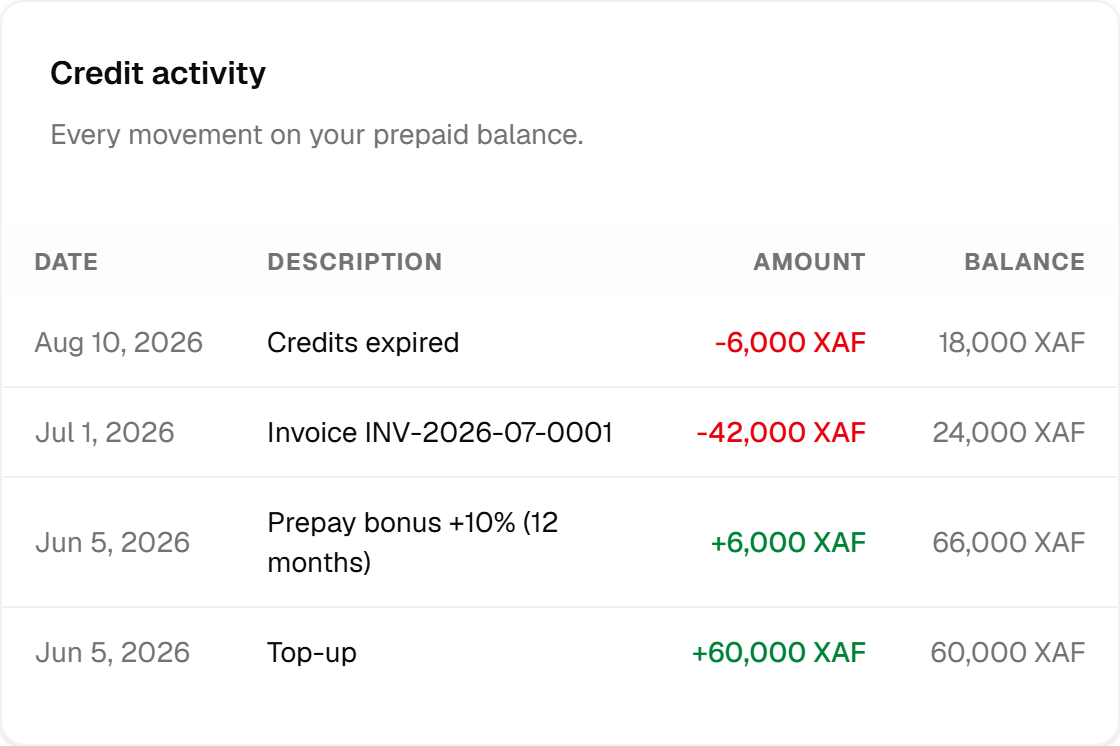
Credit activity is the full ledger, newest first: top-ups, bonuses, the usage taken each day, invoices settled, refunds, expiries, adjustments. If a balance is not what you expected, the answer is on that list — including the expiry that quietly removed credit you had stopped counting on.
Invoices, and the four words they use
An invoice is issued per month, per currency, for what ran during the period, prorated to the days each environment was actually live. What was already taken day by day counts towards it, and the rest is settled from your balance automatically — in part, if the balance cannot cover all of it.
Four statuses, and they are shown as the platform's own words:
| Status | Meaning |
|---|---|
| PAID | Settled, from your balance. |
| OPEN | Issued and not fully settled — usually because the balance did not cover it. |
| UNCOLLECTIBLE | Written off after long non-payment. It is not forgiven, and it keeps the account suspended. |
| VOID | Cancelled. It counts for nothing. |
Both OPEN and UNCOLLECTIBLE count as unpaid, which is what the balance calculation subtracts. Any row opens its detail: the lines it was built from, the tax that applied at the time, and a PDF.
Tax is snapshotted onto the invoice when it is issued. If your country's rate changes afterwards, old invoices keep the rate they were issued under, because a document that changes retroactively is not a document.
The warning that comes first
Nothing is switched off without notice. While your coverage is below the threshold — seven days by default — the page carries a warning and the team is notified, repeatedly, for as long as it lasts.

This warning is proactive: it is computed from your runway, and it fires before anything is due. It is the cheapest moment to act, and it is the only stage where nothing has happened yet.
The ladder, if nothing is done
Two different things suspend an account, and they are worth telling apart.
The balance runs out. Running on credit is not a state the platform lets last. When your balance no longer covers the day's usage and stays that way for a day, the account is suspended. A payment still being confirmed on your phone puts that on hold: nobody is suspended over money that is on its way.
An invoice goes unpaid. A collections sequence runs daily, and each stage fires once:
- Overdue — a reminder.
- Suspended — your environments are stopped, and creating, starting, resizing or deploying anything is refused while the suspension holds.
- Written off — the invoice becomes UNCOLLECTIBLE. This is an accounting state, not forgiveness: the debt stands and the account stays suspended.
- Flagged for deletion — after a further stretch of suspension. Flagged, not deleted: removing environments is never automatic, and always requires a human decision.
The delays between those stages are short — counted in days, not weeks — and set by the platform; the order never changes. The warning described above is the window to act in. Once the ladder has started, you are already late.
A suspended account is still billed. Its environments keep their storage, their database and their address, and those days are owed like any other.
Settling resets the whole machine. Top up, use Pay open invoices from balance, and the suspension lifts — your environments restart when you start them, not before, so you choose the moment.
Your plan
The same page carries your team's plan: what the platform itself lets you do, separate from what your environments cost. A new team starts on the free plan — a real plan with real limits — and the page shows what each of the others would raise.
- Nothing is ever charged automatically. When a period ends, the amount becomes due and you settle it here.
- Moving up is paid when you switch, with the unused part of the period you already paid for credited against it. Moving down costs nothing and takes effect when that period ends. A smaller plan never deletes what is already running: it stops you adding more, and keeps what you have.
- Some plans offer a free trial. It needs a confirmed email address and phone number, and when it ends the team goes back to the free plan unless you subscribe.
- A promotional code is entered when you change plan.
- This period shows what the plan meters — build minutes and AI tokens — against what it includes, and what an overage would cost if the month ended now.
Everyone on the team can see the plan. Only a member with the billing role can change it.
Who can see and do what
Three separate permissions, because these are three different jobs:
- billing.view — see the balance, the invoices and the ledger.
- billing.topup — pay: top up, redeem a coupon, settle open invoices.
- billing.manage — change the billing country, which changes the currency and the tax.
A team member without billing.view never sees this page at all. That is the point: a developer who
deploys does not need to see what the company is paying.