Configure Odoo: settings, profiles and the restart
Tuning workers, limits and SMTP on an environment - why saving is not applying, why a worker count is arithmetic rather than taste, and which keys the platform will never let you set.
Verified on September 13, 2026
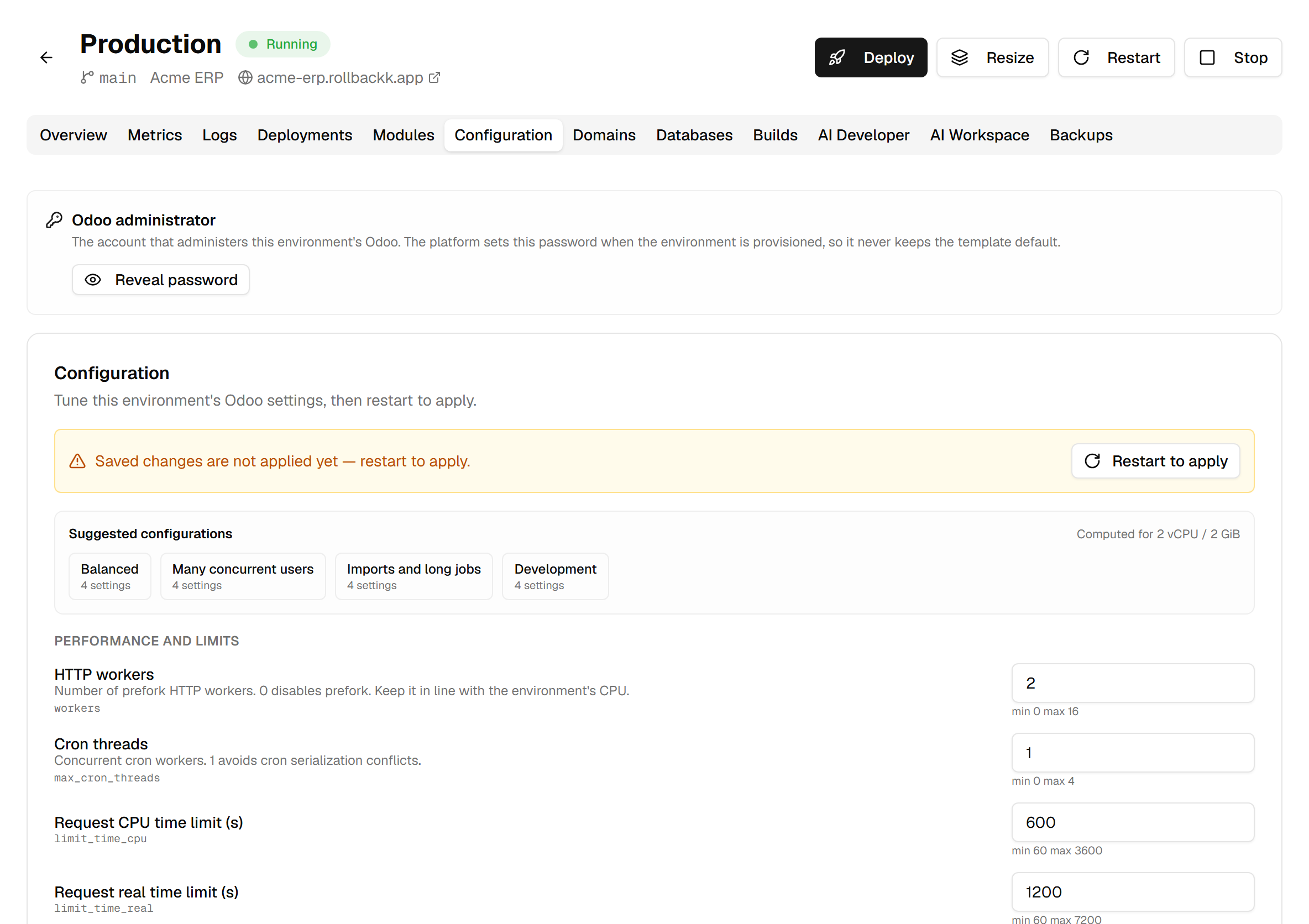
The Configuration tab is the odoo.conf of your environment, minus the parts that are not yours to
set. It is where you decide how many workers serve requests, how long a request may run, and where
outgoing email goes.
Two habits make this tab safe: read the restart banner, and treat the worker count as arithmetic rather than a preference.
What you can set, and what stays with the platform
Only keys on a safelist can ever be edited here. Everything outside it is refused — not hidden behind a warning, refused.
The keys the platform owns are database credentials, filesystem paths, ports, and the security switches that keep one environment out of another's data. They are written by the system and they win, whatever anyone sets.
A setting can also be read-only for your environment specifically: the profile it was created with narrows the safelist further. Those still appear, marked, rather than vanishing — a setting you cannot change is worth knowing about, and its value is worth reading.
Each field shows its technical key underneath (workers, limit_time_cpu), which is what you search
for in Odoo's own documentation, and its bounds beside it. The bounds are enforced again on save.
The sizing profiles
Above the settings sit four suggested configurations, and the line beside them names the shape they were computed for — this environment's own CPU and memory, not a generic table.

| Profile | For |
|---|---|
| Balanced | A normal working day. |
| Many concurrent users | More workers, shorter request limits. |
| Imports and long jobs | Long limits, so a big import is not cut off mid-run. |
| Development | Threaded mode: one process, so a breakpoint stops the thing you are debugging. |
Clicking one fills the fields and stops there. Nothing is saved, nothing restarts, and the panel says so. Review the values, then save them yourself — the click that saves is the click that will restart somebody's Odoo, and it stays yours.
The proposed values are also clamped to each setting's bounds and re-validated before you ever see them, so a profile cannot fill the form with something that fails on submit.
Why the worker count is arithmetic
Too few workers and requests queue while cores sit idle. Too many and each one gets a slice of memory too small to load a page. Both feel like "Odoo is slow" and they have opposite fixes.
The memory limits are the part worth understanding. Odoo enforces limit_memory_soft and
limit_memory_hard on itself: a worker that crosses the soft limit finishes its current request and
then recycles, cleanly. The platform enforces the environment's own memory limit on all of it at
once, and it does not ask — it kills the process.
So the profiles divide only about four fifths of the environment's memory between the processes. That headroom is the difference between a worker recycling itself and the whole environment being killed for running out of memory. If you set these by hand, leave the same margin: sizing Odoo's own limit to exactly meet the environment's limit is how an environment starts restarting under load.
An environment killed for memory shows up as a rising restart count on the Metrics tab, with nothing in the logs — the process was terminated, it did not fail. The observability guide covers reading that.
Saving is not applying
This is the one that catches everyone.
Saving writes your values. The running Odoo keeps serving with the old ones until the environment restarts, and the banner at the top of the tab says exactly that for as long as it is true.

Restart to apply does it, and it is a real restart: the environment is briefly unavailable. That is why it is a separate button rather than something save does for you — you choose the moment.
Emptying a field resets it
There is no "reset to default" button, and there does not need to be one: clear a field and save, and the setting goes back to the platform default rather than being set to an empty string.
This is the safe way out of a value you are no longer sure about. It is also worth knowing before you clear a field you only meant to retype.
Custom parameters
Below the catalog, free-form key/value pairs for settings that belong to your own modules — the ones no generic catalog can list.

They are written into the environment's configuration exactly as typed, and read by your module the same way as any other Odoo parameter. The same restart rule applies.
This block only appears when your environment's profile allows it.
What is refused, and why
Three families of key are turned away on save, and the message names the key rather than failing vaguely:
- Platform-owned keys — database, paths, ports, security. Setting them from here could point an environment at another one's data.
- Anything ending in
_pathor_db— filesystem and database pointers, refused as a family rather than one at a time, because the dangerous ones are the ones nobody thought to list. addons_pathspecifically, which deserves its own answer: it is derived from your repository at build time, one entry per directory that actually holds modules. Declaring it by hand is the normal self-hosted habit, so people try it here first and conclude the platform cannot load their layout. It can — that is exactly what the build does for you.
If a value is refused for being out of range, the bounds shown beside the field are the ones being enforced. They are checked server-side too, so a browser that lets you type 40 workers is not permission to have them.